
My Always-On AI Agent System: Telegram, Ollama, and an Obsidian Vault on a Mac Studio
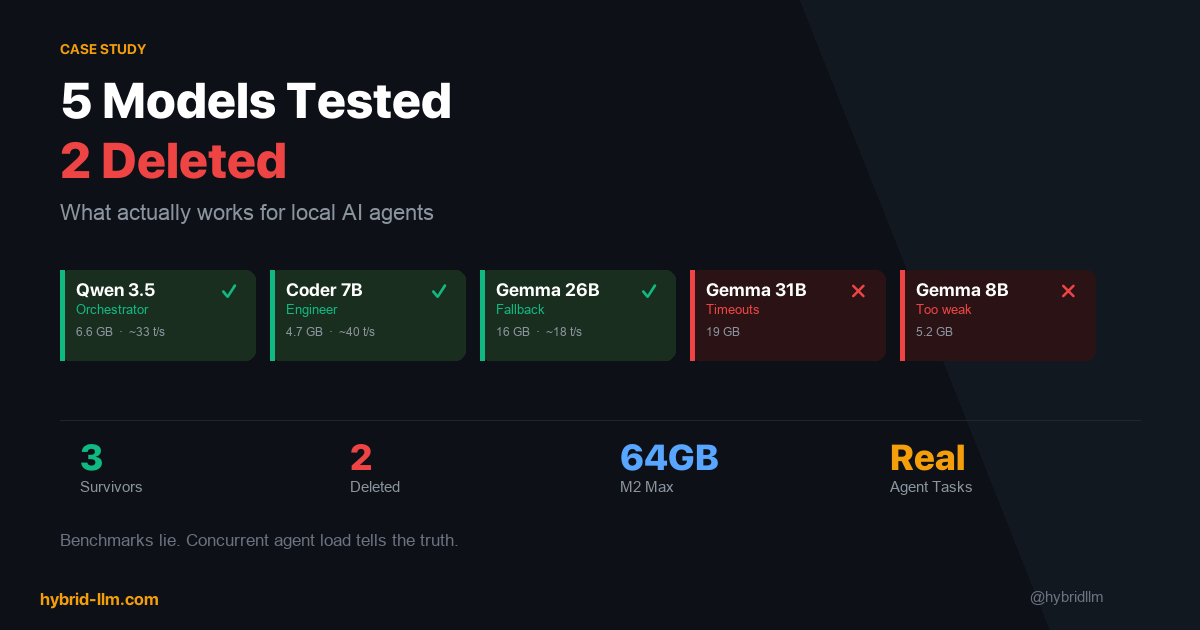
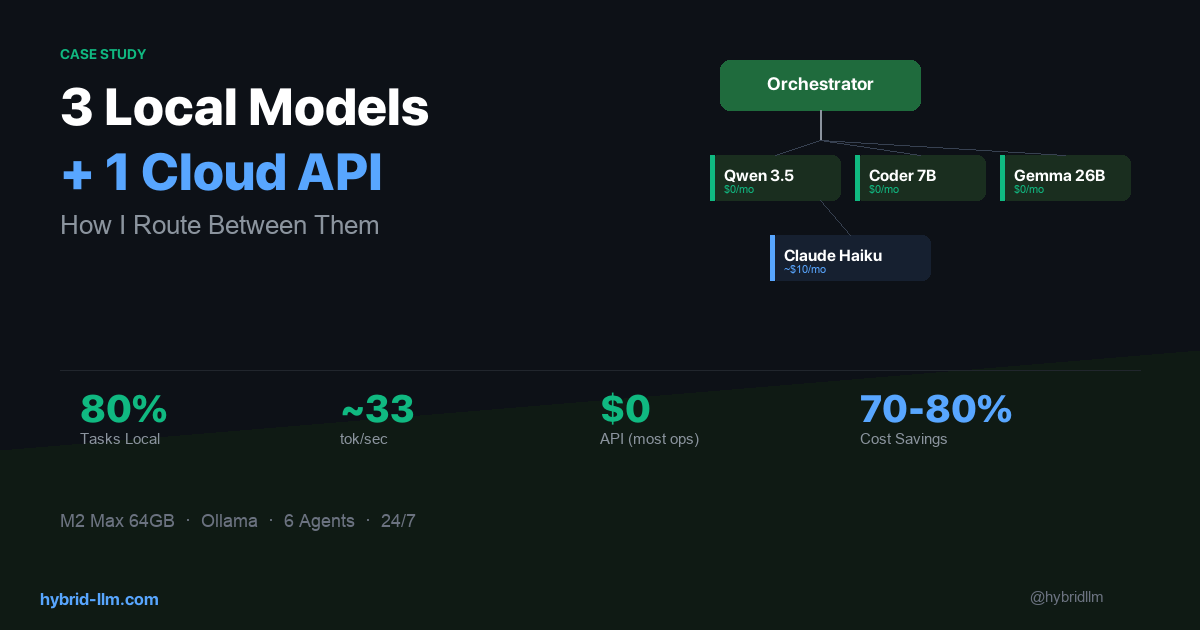
In the first article of this series, I covered how I route tasks across local and cloud models. In the second, I explained how I chose which models to keep and which to delete. This final piece is about the thing that ties it all together: the system — how it boots, how agents communicate, how they remember, and what daily life actually looks like when you run an always-on AI workflow.
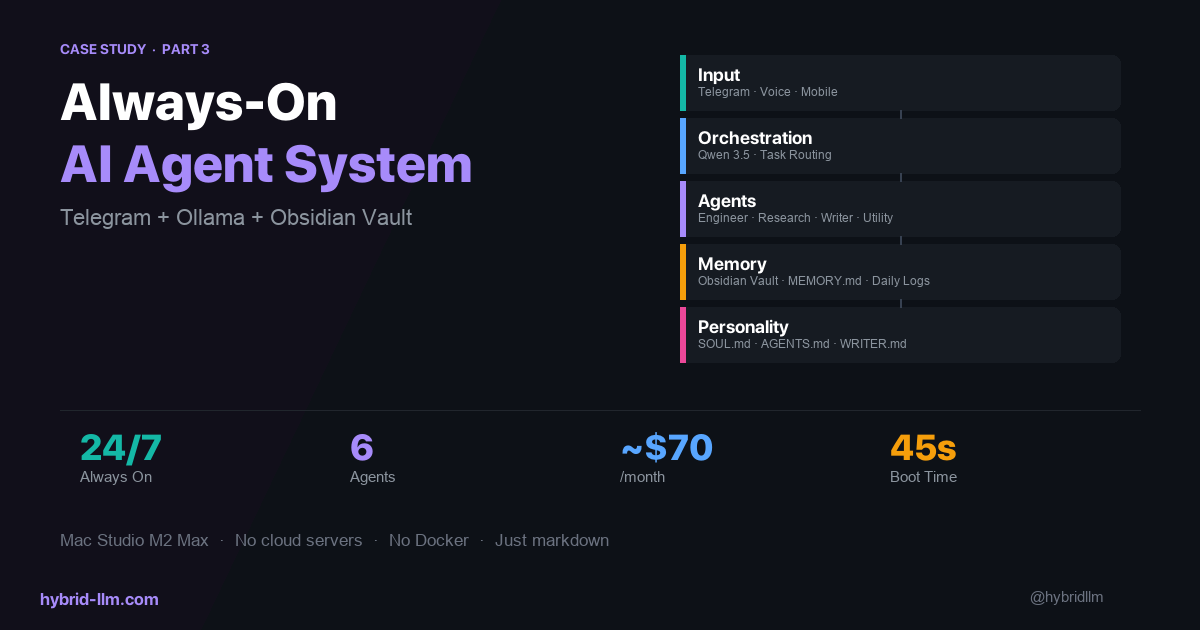
This isn’t about a single tool or model. It’s about the full loop: a message from my phone → an orchestrator that decides what to do → specialist agents that execute → a knowledge base that persists everything → a response back to my phone.
I’ve been running this system daily on my Mac Studio (M2 Max, 64GB) for several months. This is aimed at developers and power users comfortable with scripting and self-hosting — if you can write a shell script and configure a Telegram bot, you can build something like this. Here’s how it works.
Key Takeaways
- The input layer matters more than you think. I use Telegram because it’s available on every device, supports voice messages, and lets me interact with the system from anywhere — the gym, a train, or bed.
- Agents without memory are just chatbots with extra steps. Persisting context in an Obsidian vault gives agents continuity across sessions and makes the system genuinely useful over time.
- Always-on means always-warm. A boot script that preloads models into memory eliminates cold-start delays and makes the system feel instant.
- Personality files change agent behavior more than prompt engineering. Defining values, boundaries, and tone in dedicated markdown files produces more consistent results than tweaking system prompts.
- The system is simpler than it sounds. Six agents, three local models, one cloud API, a message queue, and a folder of markdown files. No Kubernetes. No microservices. Just a Mac and some well-organized text files.
Architecture: The Full Picture
Here’s the complete system:
┌─────────────────────────────────────────────────────┐
│  You (Phone / Desktop)                              │
│    Telegram message or voice note                   │
└──────────────────┬──────────────────────────────────┘
                   │
                   ▼
┌──────────────────────────────────────────────────────┐
│  Chat Agent (Qwen 3.5)                               │
│    Receives input, forwards to orchestrator           │
└──────────────────┬───────────────────────────────────┘
                   │
                   ▼
┌──────────────────────────────────────────────────────┐
│  Orchestrator Agent (Qwen 3.5)                        │
│    Classifies task → routes to specialist              │
└────┬─────────┬──────────┬────────────┬───────────────┘
     │         │          │            │
     ▼         ▼          ▼            ▼
┌────────┐ ┌────────┐ ┌────────┐ ┌────────┐
│Engineer│ │Research│ │ Writer │ │Utility │
│Coder7B │ │ Haiku  │ │ Haiku  │ │Qwen3.5 │
└────┬───┘ └───┬────┘ └───┬────┘ └───┬────┘
     │         │          │          │
     └─────────┴──────────┴──────────┘
                   │
                   ▼
┌──────────────────────────────────────────────────────┐
│  Obsidian Vault (Knowledge Base + Memory)             │
│    vault/ — projects, research, articles              │
│    memory/ — daily logs                               │
│    inbox.md — voice message queue                     │
└──────────────────────────────────────────────────────┘
Every component runs on a single Mac Studio. No cloud servers, no Docker containers, no external databases. The only cloud dependency is the Anthropic API for Claude Haiku, and even that has a local fallback (Qwen 3.5).
Layer 1: Input — Why Telegram
I tried three input methods before settling on Telegram:
| Method | Problem |
|---|---|
| Terminal / CLI | Only works when I’m at my desk |
| Slack | Too heavy for personal use, notification fatigue |
| Telegram | Available everywhere, lightweight, supports voice and text |
Telegram works because it meets three requirements:
-
Available on every device. I can send a task from my phone while walking, from my iPad on the couch, or from my desktop at work. The system doesn’t care where the input comes from.
-
Voice messages. When I have an idea but can’t type — driving, cooking, at the gym — I send a voice note. The system transcribes it and queues it in
inbox.mdfor processing. -
Instant feedback loop. The agent responds in the same Telegram thread. I send a message, get a response, send a follow-up. It feels like texting a very competent colleague.
The Voice Message Flow
Voice note (phone)
    │
    ▼
Transcription → inbox.md
    │
    ▼
Chat Agent reads inbox.md
    │
    ▼
Orchestrator routes the task
    │
    ▼
Response → Telegram thread
Voice messages get transcribed and saved to inbox.md automatically. The chat agent picks them up, the orchestrator routes them, and I get a text response back. The entire flow from voice note to response typically takes 15–30 seconds for simple tasks.
Layer 2: Orchestration — The Traffic Controller
The orchestrator is the simplest agent in the system and arguably the most important. Its entire job is:
- Read the incoming message
- Classify the intent
- Pick the right specialist agent
- Forward the task
- Return the result
That’s it. No reasoning, no creativity, no long-form generation. Just classification and routing.
Why Speed Matters Here
The orchestrator runs on Qwen 3.5 with thinking mode OFF. Classification typically completes in under 2 seconds — the user barely notices the routing step. For the full latency numbers and thinking-mode tradeoffs, see the routing article.
Routing Rules
The orchestrator follows a simple rule set defined in a system prompt:
| If the task involves… | Route to… |
|---|---|
| Writing code, fixing bugs, file operations | Engineer |
| Research, analysis, information synthesis | Research |
| Article writing, newsletter drafts, long-form content | Writer |
| Formatting, conversion, data cleanup | Utility |
| Ambiguous or multi-step | Orchestrator handles directly, then delegates sub-tasks |
For multi-step tasks, the orchestrator breaks the request into sub-tasks and delegates each one to the appropriate specialist. A request like “research this topic and write an article about it” becomes two sequential delegations: Research first, then Writer with the research output as input.
Layer 3: Specialist Agents — Each One Has a Job
The four specialist agents are covered in detail in the model selection article. Here, I’ll focus on how they work as a team.
The Engineer
Runs on Qwen 2.5 Coder 7B. Handles code generation, bug fixes, and file operations. Its output goes directly to the file system — it can create, edit, and organize files in the vault.
Limitations I’ve accepted: It can’t invoke tools (as of Q2 2026), so it generates code and file content rather than executing commands. The orchestrator or utility agent handles any execution steps.
The Researcher
Runs on Claude Haiku (cloud) with Qwen 3.5 as fallback. This is the only agent where I consistently need cloud-level quality. Research synthesis — reading multiple sources and producing coherent analysis — is where local models fall short most visibly.
When the Anthropic API is unreachable (rare but it happens), the fallback kicks in: Qwen 3.5 with /think mode enabled. The output quality drops, but the system doesn’t stop.
The Writer
Also runs on Claude Haiku. Produces newsletter drafts, article outlines, and long-form content. The writer agent has its own dedicated instruction file (WRITER.md) that defines:
- Tone: First-person, experience-based. “I tried this and here’s what happened” — not “This article will explain…”
- Structure: Cold open with a specific experience, not a generic introduction
- Source handling: Never summarize sources directly. Rewrite everything as personal experience
These instructions produce noticeably more consistent output than prompt-level instructions alone. The model follows a persistent personality rather than interpreting a new prompt each time.
The Utility Agent
Runs on Qwen 3.5. The workhorse for mechanical tasks: reformatting markdown, converting between data formats, cleaning up text, organizing files. Speed matters, quality ceiling doesn’t.
Layer 4: Memory — The Obsidian Vault
This is the layer that separates a useful system from a toy. Without persistent memory, every conversation starts from zero. With it, agents have context about past decisions, ongoing projects, and personal preferences.
The Vault Structure
openclaw-vault/
├── vault/                  # Main knowledge base
│   ├── research/           # Research summaries
│   ├── Agent Workflow Playbook/  # Newsletter drafts
│   │   └── drafts/         # Article drafts
│   └── [project folders]/  # Per-project knowledge
├── memory/                 # Daily session logs
│   ├── 2026-04-07.md       # Today's log
│   ├── 2026-04-06.md       # Yesterday's log
│   └── ...
├── inbox.md                # Voice message queue
├── MEMORY.md               # Long-term memory (agent reads this first)
├── SOUL.md                 # Agent personality & values
├── USER.md                 # User preferences & info
└── AGENTS.md               # Agent behavior rules
The orchestrator and agents run on top of OpenClaw, but the patterns here — Telegram → router → specialists → Obsidian — apply even if you build your own orchestration layer with LangGraph, CrewAI, or a custom script.
How Memory Works
There are three layers of memory, each serving a different purpose:
1. Session memory (conversation context) Each agent conversation has its own context window. This handles short-term, within-task memory. It disappears when the session ends.
2. Daily logs (memory/YYYY-MM-DD.md)
At the end of each task, relevant information gets appended to today’s log file. This creates a diary-like record that agents can reference for recent context. “What did I work on yesterday?” is answerable by reading the previous day’s log.
3. Long-term memory (MEMORY.md)
The most important file in the system. This contains persistent facts: system configuration, project status, user preferences, key decisions. Agents read this file at the start of every session. When something changes — a new project starts, a model gets swapped, a preference changes — MEMORY.md gets updated.
Why Markdown Files Beat Databases
I chose plain markdown files over a vector database or structured storage for three reasons:
-
Human-readable. I can open any file in Obsidian and see exactly what the agents “remember.” No query language, no embedding visualization tools. Just text.
-
Human-editable. If an agent remembers something wrong, I fix it by editing a markdown file. If I want to add context the agent missed, I type it in. The memory system is bidirectional.
-
Git-trackable. The entire vault is version-controlled. I can see what changed, when, and revert if an agent writes something incorrect. This has saved me twice.
Layer 5: Personality — SOUL.md and AGENTS.md
This is the part most people skip, and I think it’s the most underrated part of the entire system.
SOUL.md — Who the Agent Is
SOUL.md defines the agent’s values and behavioral boundaries:
- Be resourceful before asking. Try to figure it out. Read the file. Check the context. Search for it. Then ask if you’re stuck.
- Have opinions. You’re allowed to disagree, find things boring, prefer one approach over another.
- Remember you’re a guest. You have access to someone’s life. Treat it with respect.
This sounds abstract, but it produces measurably different behavior. An agent with SOUL.md loaded will attempt to read relevant files before asking me for context. An agent without it will ask “What file should I look at?” as its first response.
AGENTS.md — How Agents Behave
AGENTS.md defines operational rules:
- Always respond in Japanese (my working language)
- Don’t announce what you’re about to do — just do it
- After executing a tool, report the result in text
- One task per session — clear context between unrelated tasks
- Never send external messages without confirmation
WRITER.md — Specialist Instructions
The writer agent gets additional instructions on top of SOUL.md and AGENTS.md:
- Experience-based tone, not explanatory
- Cold opens from a specific moment, not a generic introduction
- Never copy source structure — rewrite through personal experience
- Research sub-agent handles source extraction; writer handles prose
The key insight: These personality files work better than system prompts because they’re persistent and composable. Every agent gets SOUL.md + AGENTS.md. The writer gets those plus WRITER.md. The rules stack, and the agents behave more consistently than when I tried to cram everything into a single system prompt.
The Boot Sequence
When the system starts (or after a reboot), here’s what happens:
Step 1: Ollama Starts
Ollama runs as a background daemon via a LaunchAgent (~/Library/LaunchAgents/). It starts automatically on login — no manual intervention.
Step 2: Model Warmup
A shell script preloads all three local models into memory:
# warmup.sh (simplified)
# Load Qwen 3.5 — orchestrator, chat, utility
curl -s localhost:11434/api/generate \
  -d '{"model":"qwen3.5:latest","prompt":"ready","keep_alive":"30m"}'

# Load Qwen 2.5 Coder — engineer
curl -s localhost:11434/api/generate \
  -d '{"model":"qwen2.5-coder:7b","prompt":"ready","keep_alive":"30m"}'

# Load Gemma 4 26B — fallback
curl -s localhost:11434/api/generate \
  -d '{"model":"gemma4:26b","prompt":"ready","keep_alive":"30m"}'
Each model gets a dummy prompt to force it into memory, with a 30-minute keep-alive. This means the first real request of the day gets a warm model — no 10–15 second cold-start delay.
Step 3: Gateway Connects
The orchestration gateway connects to Telegram and starts listening for messages. From this point, the system is live. Send a message, get a response.
Total boot time: ~45 seconds from login to fully operational. Most of that is model loading.
A Day in the Life
Here’s what a typical day looks like with this system running:
7:00 AM — Morning Voice Note
I wake up, grab my phone, and send a voice note to Telegram while making coffee: “Summarize what I worked on yesterday and list any open tasks.”
The system transcribes the voice note, the orchestrator routes it to the utility agent, which reads yesterday’s memory/ log and responds with a concise summary. By the time my coffee is ready, I know what’s on my plate.
9:00 AM — Research Request
I’m reading an article and want to go deeper. I send: “Research the current state of mixture-of-experts architectures for local inference. Focus on what’s changed in the last 3 months.”
The orchestrator routes this to the research agent (Claude Haiku). Five minutes later, I get a structured summary with key findings, notable papers, and actionable takeaways. The output also gets saved to vault/research/ for future reference.
11:00 AM — Writing Task
“Draft an article outline about model selection for local AI agents.” The orchestrator routes to the writer agent, which reads relevant files from the vault (previous research, existing articles) and produces an outline following the style defined in WRITER.md.
2:00 PM — Quick Utility Task (From My Phone)
I’m out and need a quick data reformatting. I send a message from my phone: “Convert this CSV to a markdown table: [paste data].” The utility agent handles it in seconds. I copy the result and paste it where I need it.
6:00 PM — Engineering Task
“Create a Python script that generates OGP images for blog posts with consistent branding.” The orchestrator routes to the engineer agent, which generates the code and saves it to the vault.
10:00 PM — Session Wrap-Up
The day’s work is logged in memory/2026-04-07.md. Key decisions, completed tasks, and open items are all recorded. Tomorrow morning, the cycle starts again.
What Breaks (And How I Handle It)
The system isn’t flawless. Here’s what goes wrong and how I deal with it:
Model Eviction
Ollama’s keep-alive is set to 30 minutes. If I don’t send a request for 30+ minutes, models get evicted from memory. The next request triggers a cold start (~10–15 seconds for Qwen 3.5, ~25 seconds for Gemma 4 26B).
Mitigation: For days when I know I’ll be using the system sporadically, I extend the keep-alive or add a lightweight cron job that pings the models every 20 minutes.
Context Window Overflow
Long sessions with many back-and-forth messages can overflow the context window, especially for local models with smaller contexts. When this happens, the model’s responses degrade — it starts repeating itself or losing track of earlier instructions.
Mitigation: The rule in AGENTS.md is strict: one task per session, then clear. This keeps sessions short and context fresh. For genuinely long tasks, I break them into multiple sessions with the orchestrator tracking progress in the vault.
Anthropic API Downtime
Rare but it happens. When Claude Haiku is unreachable, the research and writer agents fall back to Qwen 3.5 with thinking mode enabled. Quality drops, but the system stays operational.
Mitigation: I accept the quality tradeoff for continuity. If the API is down during a critical writing task, I wait. For research, the local fallback is usually good enough to keep moving.
Vault Conflicts
If I edit a vault file in Obsidian while an agent is writing to the same file, things can get messy.
Mitigation: Git. The vault is version-controlled, so conflicts are recoverable. In practice, I avoid editing files I know agents are actively using — the daily logs and inbox are agent-only territory.
Security Note
Running an always-on system with access to your personal vault means local does not equal invulnerable. If your machine is compromised, so is your vault — every file, every memory log, every API key stored on disk. Treat OS-level security (FileVault, firewall, automatic updates) and offsite backups as part of the system design, not an afterthought.
What This Costs
Full monthly cost for the complete system:
| Component | Monthly Cost |
|---|---|
| Mac Studio M2 Max 64GB (amortized over 4 years) | ~$50 |
| Electricity (always-on Mac Studio) | ~$8–12 |
| Anthropic API (Claude Haiku for research + writing) | ~$5–15 |
| Ollama, Obsidian, Telegram | $0 |
| Custom domain (hybrid-llm.com) | ~$1 |
| Total | ~$65–80/month |
For context, a single ChatGPT Plus subscription is $20/month and gives you one model, no agents, no persistent memory, no automation. This system runs six agents with persistent memory and always-on availability for roughly 3x that cost — most of which is hardware you already own.
How to Build Something Like This
You don’t need to replicate my exact setup. Start with the minimum viable system and expand:
Phase 1: One Model, One Agent (Weekend Project)
- Install Ollama
- Load Qwen 3.5
- Connect to Telegram via a simple bot
- One agent that responds to messages
This gets you a working local AI assistant you can text from your phone. No orchestration, no routing, no memory — just a model that responds.
Result: A local AI you can message from anywhere.
Phase 2: Add Memory (Week 2)
- Create a vault folder structure
- Add
MEMORY.mdfor persistent context - Have the agent read
MEMORY.mdat session start - Log conversations to daily files
Now your agent remembers things between sessions. This is where the system stops feeling like a chatbot and starts feeling like an assistant.
Result: A single agent that actually remembers you.
Phase 3: Add Specialists (Week 3-4)
- Add a second model (Qwen 2.5 Coder for engineering tasks)
- Build a simple orchestrator that routes by keyword
- Define personality files (
SOUL.md,AGENTS.md)
Now you have a multi-agent system with role separation. The orchestrator doesn’t need to be sophisticated — keyword matching handles 90% of routing correctly.
Result: Multiple specialists that handle different tasks automatically.
Phase 4: Add Cloud Fallback (When Needed)
- Add Claude Haiku API for quality-critical tasks
- Configure fallback chains
- Add warmup scripts for reliability
This is where the hybrid architecture kicks in. You’ve been running local-only, and now you add cloud capacity exactly where it’s needed.
Result: The full hybrid system — local speed with cloud quality where it matters.
What I’d Do Differently
-
Start with memory, not agents. A single agent with good memory is more useful than three agents with no memory. Get
MEMORY.mdand daily logging working first. -
Write SOUL.md before writing prompts. Personality files sound like a gimmick until you see the consistency improvement. Define who the agent is before defining what it does.
-
Use voice input from day one. The biggest unlock wasn’t a new model or a better prompt — it was being able to interact with the system while away from my desk. Voice input via Telegram made the system genuinely always-accessible, not just always-on.
-
Keep sessions short. Long sessions cause context overflow and confused agents. One task, one session, clear context, move on.
The Series Recap
This three-part series covered my complete hybrid LLM system:
- Routing — How I decide which model handles which task, and why 80% of workload stays local
- Model Selection — The 5 models I tested, the 2 I deleted, and the framework for choosing models for agent workloads
- This article — The complete system: input, orchestration, memory, personality, and daily workflow
The core thesis of this site — that the smartest AI strategy is hybrid, running locally when you can and calling the cloud only when you must — isn’t just theory for me. It’s what I do every day.
If you’re interested in building something similar, start with the implementation guide for the technical foundation, then use this series for the real-world decisions that make it work.
Further Reading
- I Run 3 Local Models and 1 Cloud API — Here’s How I Route Between Them — Part 1: The routing layer
- 5 Models Tested, 2 Deleted: What Actually Works for Local AI Agents — Part 2: Model selection
- Building Your Hybrid LLM Stack — The implementation guide this system is built on
- Complete Beginner’s Guide to Local LLMs — If you’re starting from scratch
- LLM Cost Optimization — The cost framework validated by this system