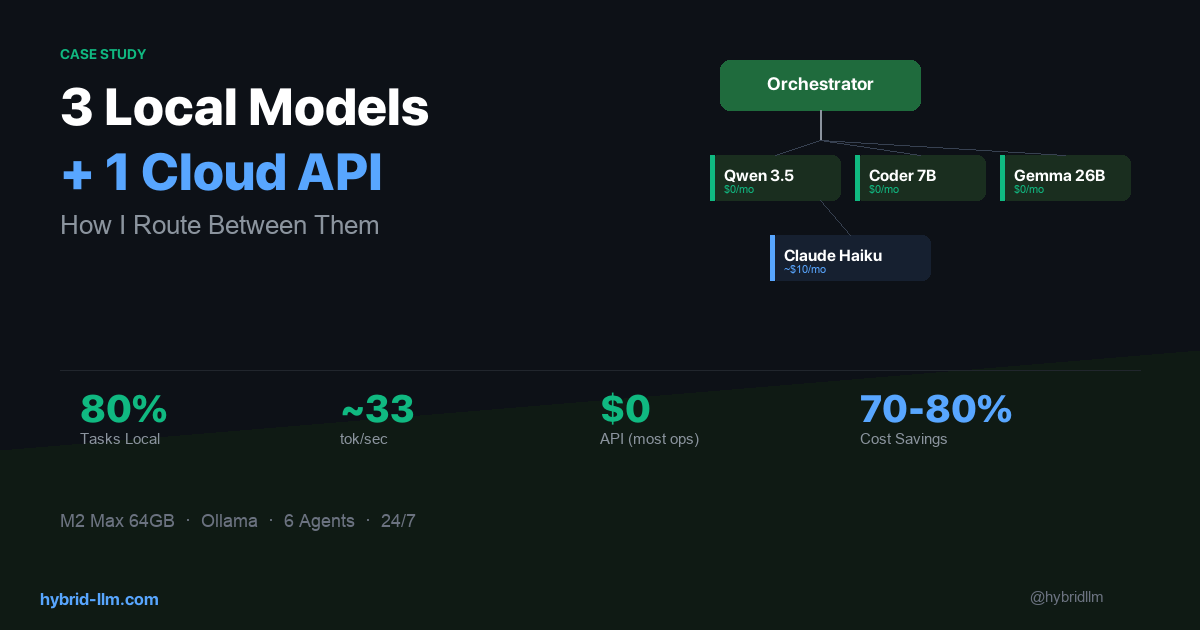

I Run 3 Local Models and 1 Cloud API — Here’s How I Route Between Them
I’ve written about hybrid LLM architecture and the theory behind smart routing. Now I want to show you what it actually looks like when you commit to it.
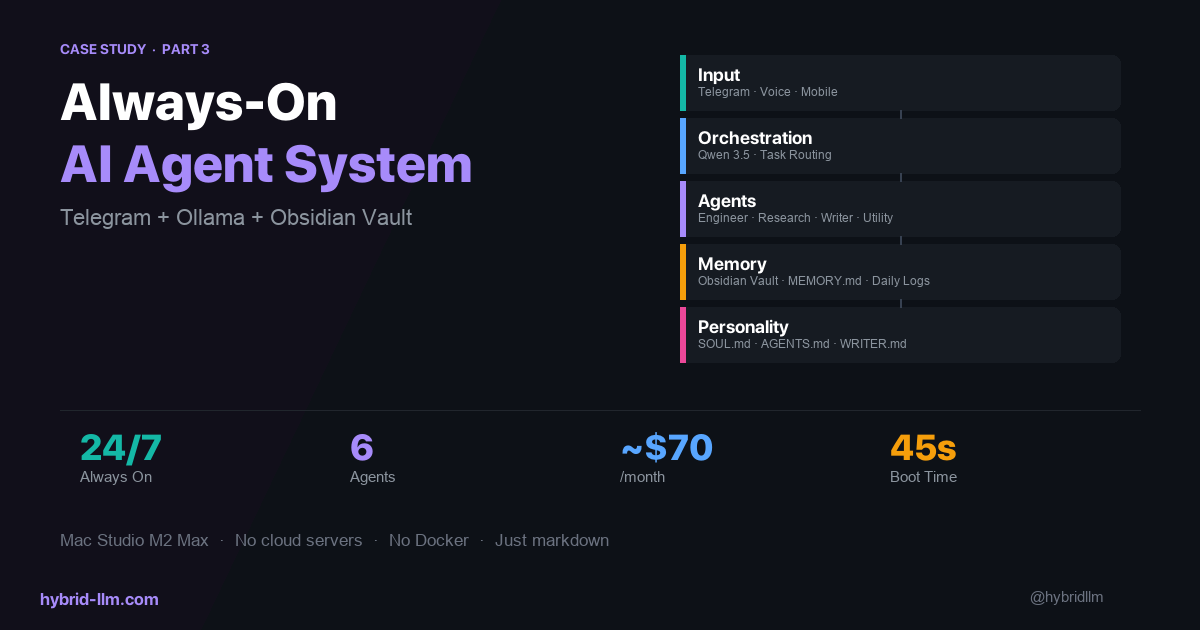
For the past several months, I’ve been running a multi-agent AI system on my Mac Studio (M2 Max, 64GB). Six agents, three local models, one cloud API. It handles research, writing, coding, and task orchestration — all day, every day.
This isn’t a weekend experiment. It’s my daily production workflow. And the routing decisions I’ve made — which model handles what, and why — are the most important part of the whole system.
Here’s the full breakdown.
Key Takeaways
- Not all agents need the same model. An orchestrator routing tasks needs speed, not brilliance. A research agent needs depth, not speed. Matching models to roles is the core skill.
- Local models handle ~80% of my agent workload — task routing, code generation, formatting, and utility tasks run entirely on-device.
- Cloud API fills a specific gap, not a general one. I only call Claude Haiku for research synthesis and long-form writing where local models visibly underperform.
- Fallback chains prevent downtime. Every agent has a secondary model. If the primary is busy or slow, the fallback picks up instantly.
- The real cost is $0/month for most operations. Cloud API costs stay minimal because the router only escalates when quality genuinely requires it.
The System at a Glance
Here’s what’s running on my machine right now:
Telegram (mobile input)
    │
    ▼
  Chat Agent ──→ Orchestrator Agent
                    │
         ┌──────────┼──────────┐
         ▼          ▼          ▼
    Engineer    Research     Writer
     Agent       Agent       Agent
                               │
                          Utility Agent
Six agents, each with a specific role. The orchestrator receives tasks and delegates to specialists. The orchestration layer is implemented with OpenClaw, but the routing principles here apply no matter which orchestration framework you use — LangGraph, CrewAI, or a custom script.
Nothing revolutionary about the pattern — what matters is which model powers each agent, and why.
The Model Lineup
Here’s what I’m actually running:
| Agent | Primary Model | Fallback Model | Why This Pairing |
|---|---|---|---|
| Chat | Qwen 3.5 (local) | Gemma 4 26B (local) | Needs speed for real-time Telegram responses |
| Orchestrator | Qwen 3.5 (local) | Gemma 4 26B (local) | Task classification needs to be fast, not deep |
| Engineer | Qwen 2.5 Coder 7B (local) | Gemma 4 26B (local) | Code-specialized, small and fast |
| Research | Claude Haiku (cloud) | Qwen 3.5 (local) | Synthesis quality justifies the API cost |
| Writer | Claude Haiku (cloud) | Qwen 3.5 (local) | Long-form quality matters for published content |
| Utility | Qwen 3.5 (local) | Gemma 4 26B (local) | Formatting and cleanup — speed over quality |
Three local models. One cloud API. That’s it.
Why This Split?
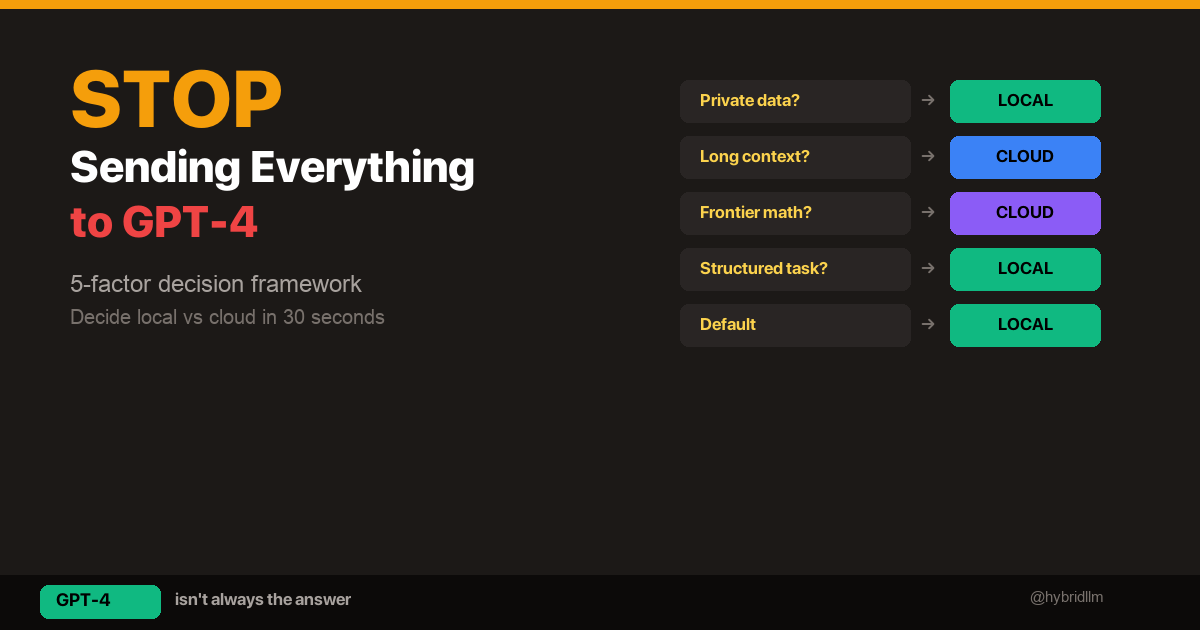
The routing logic comes down to one question: Does this task’s output quality visibly degrade with a local model?
-
Orchestrator and Chat: These agents classify tasks and relay messages. They don’t generate user-facing content. Speed is everything — Qwen 3.5 responds at ~33 tokens/sec locally, which feels instant. Sending this to a cloud API would add latency for zero quality gain.
-
Engineer: Code generation is one area where smaller specialized models punch above their weight. Qwen 2.5 Coder 7B at only 4.7GB produces surprisingly competent code for its size. It doesn’t need to be brilliant — it needs to be fast and syntactically correct.
-
Research and Writer: This is where I draw the line. When an agent needs to synthesize multiple sources into coherent analysis, or produce long-form content that someone will actually read, the quality gap between local 7B models and Claude Haiku is real and obvious. These two agents justify the cloud API cost.
-
Utility: Reformatting markdown, converting data structures, cleaning up text — these are mechanical tasks. The cheapest, fastest model wins.
The Fallback System
Every agent has a fallback model. This wasn’t in my original design — I added it after learning the hard way that local models occasionally stall under concurrent load.
# Simplified routing logic
primary: qwen3.5:latest
fallback: gemma4:26b
timeout: 30s
max_concurrent: 2
When two agents try to use the same model simultaneously on my M2 Max, the second request queues. If the wait exceeds 30 seconds, the fallback model picks up the task instead.
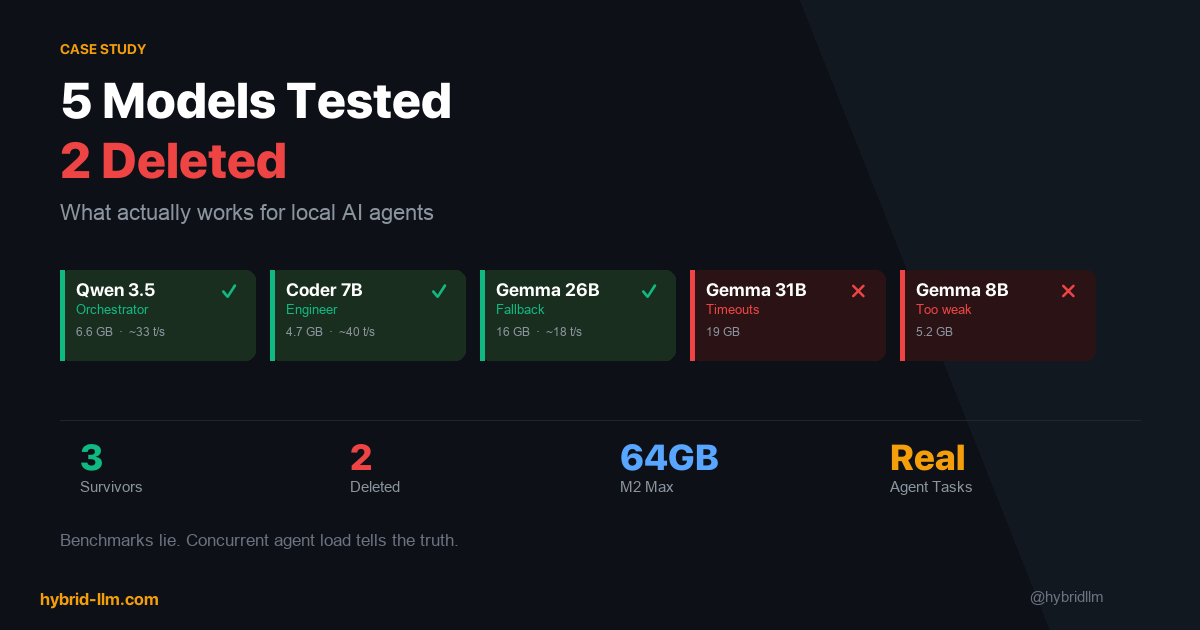
In practice, Gemma 4 26B serves as the universal safety net. At 16GB, it’s heavier than Qwen 3.5 (6.6GB) but still fits comfortably in my 64GB of unified memory alongside the other two models.
Memory Layout
Here’s what the three-model stack looks like in practice:
| Model | Memory Usage | Role |
|---|---|---|
| Qwen 3.5 | ~6.6 GB | Primary for 4 agents |
| Qwen 2.5 Coder 7B | ~4.7 GB | Engineer only |
| Gemma 4 26B | ~16 GB | Fallback for all agents |
| Total | ~27 GB | Leaves ~37 GB free |
On a 64GB machine, this leaves comfortable headroom for the OS, editor, browser, and background processes. If you’re on 32GB, you’ll need to choose two of the three and rely more heavily on cloud fallback.
All three models stay loaded in memory with a 30-minute keep-alive window. A warmup script preloads them at boot, so the first request of the day doesn’t eat a 15-second cold start.
What I Tried and Deleted
The current lineup is the result of trial and error. Here’s what didn’t survive:
Gemma 4 31B — Timeout Cascades
On paper, 31B should be the sweet spot between 26B and a 70B model. In practice, on my M2 Max with three models loaded, Gemma 4 31B caused timeout cascades. One slow response would stall the orchestrator, which would stall every agent waiting for task assignments. I deleted it after three days.
Lesson: In a multi-agent system, a slow model doesn’t just hurt itself — it creates a bottleneck that cascades through the entire pipeline.
Gemma 4 8B — Not Enough for Anything
I tested the 8B variant as a lightweight fallback. The quality was noticeably worse than Qwen 3.5 at roughly the same parameter count, and it didn’t bring any speed advantage worth the tradeoff. Deleted after one day.
Lesson: Smaller isn’t always faster when it means you need to retry failed tasks. Net throughput matters more than raw token speed.
Qwen 2.5 Coder 7B as a General Agent — Tool Calling Trap
This was my most expensive mistake in terms of debugging time. As of Q2 2026, Qwen 2.5 Coder 7B is excellent at generating code — but it doesn’t support tool calling. I tried to use it as a general-purpose agent that could read files, execute commands, and interact with APIs. It simply couldn’t.
This isn’t documented prominently anywhere. I discovered it by watching the agent silently fail to invoke tools, generating plausible-looking but non-functional tool call syntax instead.
Lesson: Always verify tool calling support separately from code generation ability. They’re different capabilities, and model cards don’t always make the distinction clear.
The Cost Reality
Here’s my actual monthly cost breakdown:
| Component | Monthly Cost | Notes |
|---|---|---|
| Local models (Qwen 3.5, Qwen 2.5 Coder, Gemma 4 26B) | $0 | Electricity only (~$3-5) |
| Claude Haiku API (research + writing) | ~$5–15 | Varies by article output volume |
| Ollama | $0 | Open source |
| Mac Studio (amortized) | ~$50 | $2,400 over 4 years |
| Total | ~$55–65/month |
Compare this to running everything through cloud APIs:
| If All Cloud | Estimated Monthly Cost |
|---|---|
| GPT-4 for all 6 agents | $200–500+ |
| Claude Sonnet for all 6 agents | $150–300+ |
The hybrid approach saves me roughly 70–80% compared to cloud-only. And most of that remaining cost is hardware amortization — the actual API spend is under $15/month. If you look at API spend alone, the reduction is even starker: from an estimated $200–500/month down to under $15.
This validates the cost model I described in LLM Cost Optimization. The theory works. But only if you’re disciplined about what actually needs the cloud.
Routing Decisions I Got Wrong (At First)
Mistake 1: Starting Everything on Cloud
When I first set up the system, I routed Research and Writer to cloud APIs immediately — but I also routed the Orchestrator to Claude. The reasoning was “the orchestrator makes important decisions about task routing, so it needs the best model.”
Wrong. The orchestrator’s decisions are simple: parse the user’s intent, pick an agent, forward the task. A 7B local model handles this just as well as Claude, and responds 5x faster. Moving the orchestrator to Qwen 3.5 was the single biggest latency improvement in the whole system.
Rule of thumb: If the agent’s output is consumed by another agent (not a human), it probably doesn’t need a cloud model.
Mistake 2: Treating “Thinking Mode” as Always-On
Some local models support extended thinking (Qwen 3.5 has a /think prefix mode). I initially enabled it for the orchestrator, expecting better task classification.
It made the orchestrator 3x slower with no measurable improvement in routing accuracy. Thinking mode is valuable for research — where depth matters — but counterproductive for fast classification tasks.
Rule of thumb: Extended thinking is for agents that need to reason. Agents that need to decide quickly should have thinking mode off.
Mistake 3: No Fallback = Silent Failures
My original setup had no fallback chains. When Qwen 3.5 was busy handling a chat request, the orchestrator would queue behind it. The user would send a message, wait 45 seconds, and get nothing.
Adding Gemma 4 26B as a universal fallback solved this immediately. The quality difference between Qwen 3.5 and Gemma 4 26B is negligible for most tasks — but the reliability difference between “responds in 2 seconds” and “responds in 45 seconds” is huge.
How to Apply This to Your Own Setup
You don’t need six agents to benefit from this routing approach. The principles work at any scale:
1. Audit Your Current Model Usage
List every AI task you run regularly. For each one, answer: Would I notice a quality difference if this ran on a smaller/local model?
Be honest. Most people overestimate how many of their tasks actually need frontier-class models.
2. Assign Tiers Based on Output Consumer
| Output goes to… | Recommended tier |
|---|---|
| Another AI agent | Local (cheapest/fastest) |
| Developer (internal) | Local or small cloud |
| End user (published) | Cloud API |
| Logs/monitoring | Local (cheapest) |
3. Add Fallbacks Before You Need Them
Don’t wait for your system to fail under load. Configure a fallback model for every primary. The fallback doesn’t need to be as good — it just needs to be available.
4. Measure, Then Optimize
Log every request: which model handled it, how long it took, and whether the output was acceptable. After a week of data, you’ll see exactly where you’re overspending and where you’re under-provisioning.
Hardware Requirements
To run a setup similar to mine:
| Component | Minimum | My Setup |
|---|---|---|
| Machine | Mac Mini M2 (24GB) | Mac Studio M2 Max (64GB) |
| RAM | 24GB (2 models) | 64GB (3 models + headroom) |
| Models loaded | 2 concurrent | 3 concurrent |
| Storage | 50GB for models | 50GB for models |
With 24GB, you can run two models concurrently (e.g., Qwen 3.5 + Qwen 2.5 Coder). With 64GB, you get the full three-model stack with comfortable headroom for the OS and other applications.
See the complete hardware guide for detailed benchmarks by Apple Silicon tier.
What I’d Do Differently Starting Over
-
Start with two models, not three. Qwen 3.5 for general tasks + Claude Haiku for quality-critical output. Add the specialized coder model only after you’ve confirmed the orchestrator routing works.
-
Build the fallback system on day one. Not day three, after your first cascade failure.
-
Keep a routing log from the start. I didn’t log which model handled which task for the first two weeks. That’s two weeks of optimization data I’ll never get back.
-
Test tool calling separately. Before assigning a model to an agent role, verify it can actually invoke the tools that agent needs. Don’t assume.
What’s Next
This article covers the routing layer — how I decide which model handles which task. In the next article, I’ll go deeper into the model selection process: the specific tests I ran, the models I evaluated and rejected, and the benchmarks that actually mattered for agent workloads (spoiler: they’re not the ones on leaderboards).
If you’re building your own hybrid setup, start with the implementation guide for the technical foundation, then come back here for the real-world routing decisions.
Further Reading
- Hybrid LLM Architecture: Save 50-70% on AI Costs with Smart Routing — The theoretical framework behind this routing approach
- Building Your Hybrid LLM Stack: Complete Implementation Guide — Step-by-step setup guide
- Best Local LLM Models for M2/M3/M4 Mac — Hardware benchmarks and model recommendations
- LLM Cost Optimization — The cost math that this system validates
- Ollama vs LM Studio — Why I chose Ollama as the local backend